Claude Code is Anthropic's terminal agent. With the brain connected, it reads your company's conventions, decisions and system cards before it touches a repo, and it can file what it learns back into the brain. One command adds the server, one slash command signs you in.
At a glance
| Works on | macOS, Linux, Windows (terminal), plus the VS Code and JetBrains extensions |
| Plans | Any Claude plan with Claude Code access |
| Sign-in | OAuth from the terminal, opens your browser once |
| Time | Two minutes |
| Instructions live in | A CLAUDE.md file, not a settings screen |
Step 1: add the brain
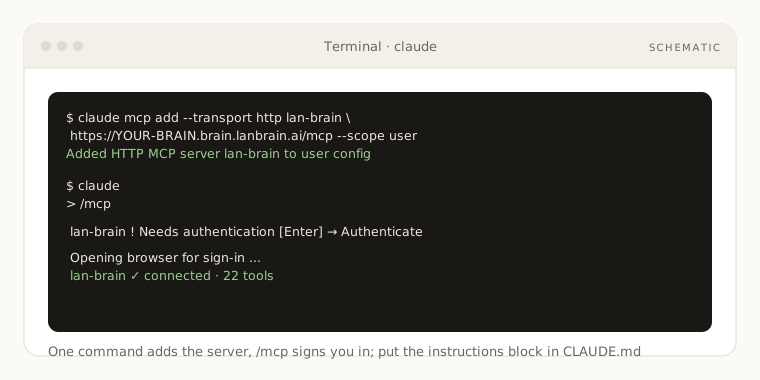
Run this once, replacing the URL with your MCP URL from the dashboard (Your brain, then Connect AI app):
claude mcp add --transport http lan-brain https://YOUR-BRAIN.brain.lanbrain.ai/mcp --scope user
--scope user makes the brain available in every project on this machine. Drop it if you only want it in the current directory. Use --scope project to share the config with your team through a checked-in .mcp.json:
{
  "mcpServers": {
    "lan-brain": {
      "type": "http",
      "url": "https://YOUR-BRAIN.brain.lanbrain.ai/mcp"
    }
  }
}
Step 2: sign in
- Start
claudeand type/mcp. - Select
lan-brain. It shows Needs authentication. Press Enter and choose Authenticate. - Your browser opens a LAN Brain sign-in page. Use your usual account and approve.
- Back in the terminal the server shows as connected and lists its tools.
The same /mcp screen is where you reconnect if a session ever shows the server as disconnected.
Step 3: put the instructions in CLAUDE.md
Claude Code reads a CLAUDE.md file at the start of every session. Paste the instructions block from the dashboard's Connect AI app tab into one of these:
| File | Applies to |
|---|---|
~/.claude/CLAUDE.md | Every project on this machine (recommended for a personal brain) |
./CLAUDE.md in a repo | That repo, shared with the team through git (recommended for a company brain) |
./CLAUDE.local.md | That repo, only you, ignored by git |
A minimal company CLAUDE.md looks like this:
# Working with our company brain

My LAN Brain connector is the source of truth about Acme: its business, people, and decisions.
Before answering anything that depends on my context (my projects, my company,
my decisions, the people I work with), call search_brain first. If the brain has
nothing, say so instead of guessing. When the brain conflicts with what you think
you know, the brain wins; cite the page path.
Do NOT use the connector for general knowledge: definitions, public facts, coding
help, anything you could answer without knowing me.
Answer bottom-line-up-front: the answer first, then only the context that changes
my next step.
When I correct you on something durable, fold it into the brain (apply_learning)
and tell me in one line what you updated. A single ambiguous comment is not a
durable correction.
Use the block the dashboard generates rather than retyping it: it already carries the routing lines if you have several brains.
Try it
- "Before we start, read the brain's software conventions for this repo and list what applies."
- "What did the team decide about authentication for the mobile app? Link the decision page."
- "We just agreed the API version policy in this chat. File it in the brain as a decision under the engineering department."
If something is off
/mcpshows the server as failed: the URL must end in/mcp. Runclaude mcp listto see what was saved andclaude mcp remove lan-brainto start over.- Tools connected but Claude never calls them: the
CLAUDE.mdis missing or in a directory Claude Code is not reading. Run/memoryto see which files are loaded. - Authentication expired after days away: open
/mcpand authenticate again. Nothing else changes.
More in Troubleshooting.