GitHub Copilot's agent mode in VS Code talks to MCP servers natively, with OAuth built in. Add the brain once and every agent session can read your company's conventions, decisions and systems before it changes code.
At a glance
| Works on | VS Code with the GitHub Copilot Chat extension, agent mode |
| Plans | Any Copilot plan; organization admins can restrict MCP for Business and Enterprise seats |
| Sign-in | OAuth. VS Code registers itself with the brain and opens the sign-in page |
| Time | Two minutes |
| Instructions live in | .github/copilot-instructions.md (repo) or a user instructions file |
Step 1: add the brain
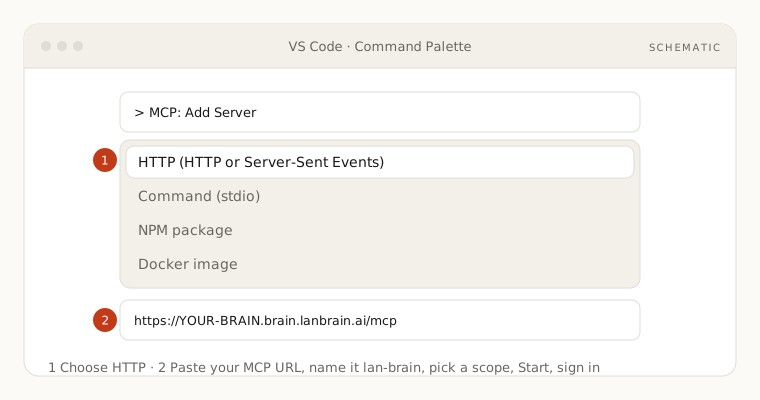
With the command palette: run MCP: Add Server, choose HTTP (HTTP or Server-Sent Events), paste your MCP URL, name it lan-brain, and pick the scope: Global for every workspace, Workspace to write it into the repo for the team.
Or by file: create .vscode/mcp.json in the repo:
json
{
  "servers": {
    "lan-brain": {
      "type": "http",
      "url": "https://YOUR-BRAIN.brain.lanbrain.ai/mcp"
    }
  }
}
Your MCP URL is in the dashboard under Your brain, then Connect AI app.
Step 2: start it and sign in
- Run MCP: List Servers, select
lan-brain, then Start. - VS Code detects that the brain needs sign-in and opens the LAN Brain page in your browser. Approve with your usual account.
- The server shows as running. In Copilot Chat, switch to Agent mode and open the tools picker to confirm the brain's tools are listed and enabled.
Step 3: put the instructions in Copilot's instructions file
- Copy the instructions block from the dashboard's Connect AI app tab.
- For a repo, shared with the team: paste it into
.github/copilot-instructions.md(create the file if it does not exist). Copilot reads it on every request in that repo. - For yourself across all repos: run Chat: New Instructions File, choose the user profile location, and paste it there.
Try it
In agent mode:
- "Read the brain's conventions for this service and check the file I have open against them."
- "Which internal systems does this project depend on, according to the brain, and how do we reach each one?"
- "Summarize the architecture decision about caching and apply it to this module."
If something is off
- Server fails to start: the URL must end in
/mcpand the type must behttp. Open MCP: List Servers, then Show Output for the exact error. - No sign-in page opens: run MCP: List Servers, select the server, and choose Restart; then look for an account prompt in the VS Code accounts menu (bottom left).
- Tools exist but Copilot does not use them: you are in Ask mode. Switch to Agent mode, and confirm the instructions file is in place.
- Organization blocks MCP: a Copilot admin has to allow MCP servers in the organization policy.
More in Troubleshooting.