The connector does not appear, the AI answers from memory, sign-in loops, empty results. Each symptom with its fix.
Most connection problems are one of a dozen things. Find your symptom, apply the fix, and try again in a new chat. If none of these match, write to info@lanbrain.ai with the client name, your brain's name and a screenshot of the error.
Connecting
Symptom
Likely cause
Fix
The client rejects the URL
The URL does not end in /mcp, or has a typo in the brain name
Copy it again from the dashboard (Your brain, then Connect AI app)
The client says the server failed to start or is unreachable
Wrong transport or field name
Use HTTP, not SSE. Cursor and Zed use url, VS Code uses type: http plus url, Windsurf uses serverUrl, Gemini CLI uses url plus type: http. Restart the client after editing a config file
No option to add a custom connector
Plan or admin gate
ChatGPT: on Business only admins add apps and members connect the published one; on Enterprise and Edu an admin grants developer mode first; Pro is read only; Free and Plus are not supported. Claude Team and Enterprise: an Owner enables it first. Gemini app: US personal accounts only
Claude Free says the limit is reached
Free allows one custom connector
Remove another custom connector, or upgrade
Signing in
Symptom
Likely cause
Fix
The sign-in page opens but access is denied afterwards
You signed in with an account that has no access to that brain
Sign out at lanbrain.ai, then connect again with the invited account
The sign-in loops or the client says "needs authentication" again
The browser blocked the redirect back, or the session was left half-done
Finish the sign-in in the same browser the client opened. In Claude Code and Gemini CLI, run the authenticate command again
"Invalid token" or 401 after days away
The session expired
Sign in again from the client's MCP settings. Nothing else changes
The magic link email never arrives
It is in spam, or a link scanner spent it
Check spam first. Request a new link and open it once, in the browser you will use
Using it
Symptom
Likely cause
Fix
Tools are listed but the AI never calls them
No instructions block in that client
Paste the block from the Connect tab into the client's custom instructions. Where, per client. Start a new chat
The AI answers from memory even with the block
Old chat, or the block is in the wrong place
Start a new chat. In Claude Code run /memory to confirm the file is loaded; in Cursor check that the rule has alwaysApply: true
"The brain has nothing on that" for something you know exists
You do not have access to that page, or the page is under review or in a restricted department
Ask the brain admin. Access is per person and per department by design; the AI is told to say "nothing" rather than reveal what it cannot show
The answer is stale
The AI read a page that has not been updated
Say "check what changed since then" or update the page. Figures the brain marks as volatile are flagged as needing a refresh
The AI reaches for the brain on every question
The negative clause is missing from the block
Paste the block exactly as generated; do not add "always use the brain"
A tool appeared in the dashboard but not in the client
The client cached the tool list
ChatGPT: open the app in Settings and click Refresh. Editors: restart. Claude: start a new chat
Writes fail on a company brain
The department is read only for members, or the page is pending review by someone else
Ask a department admin, or check Review in the dashboard
Rate limit or "too many requests"
A burst of calls, often from a loop
Wait a minute. If it recurs, tell us which client and prompt
Mobile and platforms
Symptom
What is going on
ChatGPT on the phone does not show the connector
OpenAI has not shipped MCP apps on mobile or in voice mode. Use the web
Claude mobile does not show a connector I just added
Sign out and back in on the phone; connectors sync at sign-in. Adding one from the phone itself is still in beta
Gemini app has no "Custom apps" section
Work or school account, outside the US, or under 18. Use the CLI or Gemini Enterprise
Claude Desktop asks for a config file
Not needed. Connectors added on the web are already in the desktop app under Customize, then Connectors
Checking the brain itself
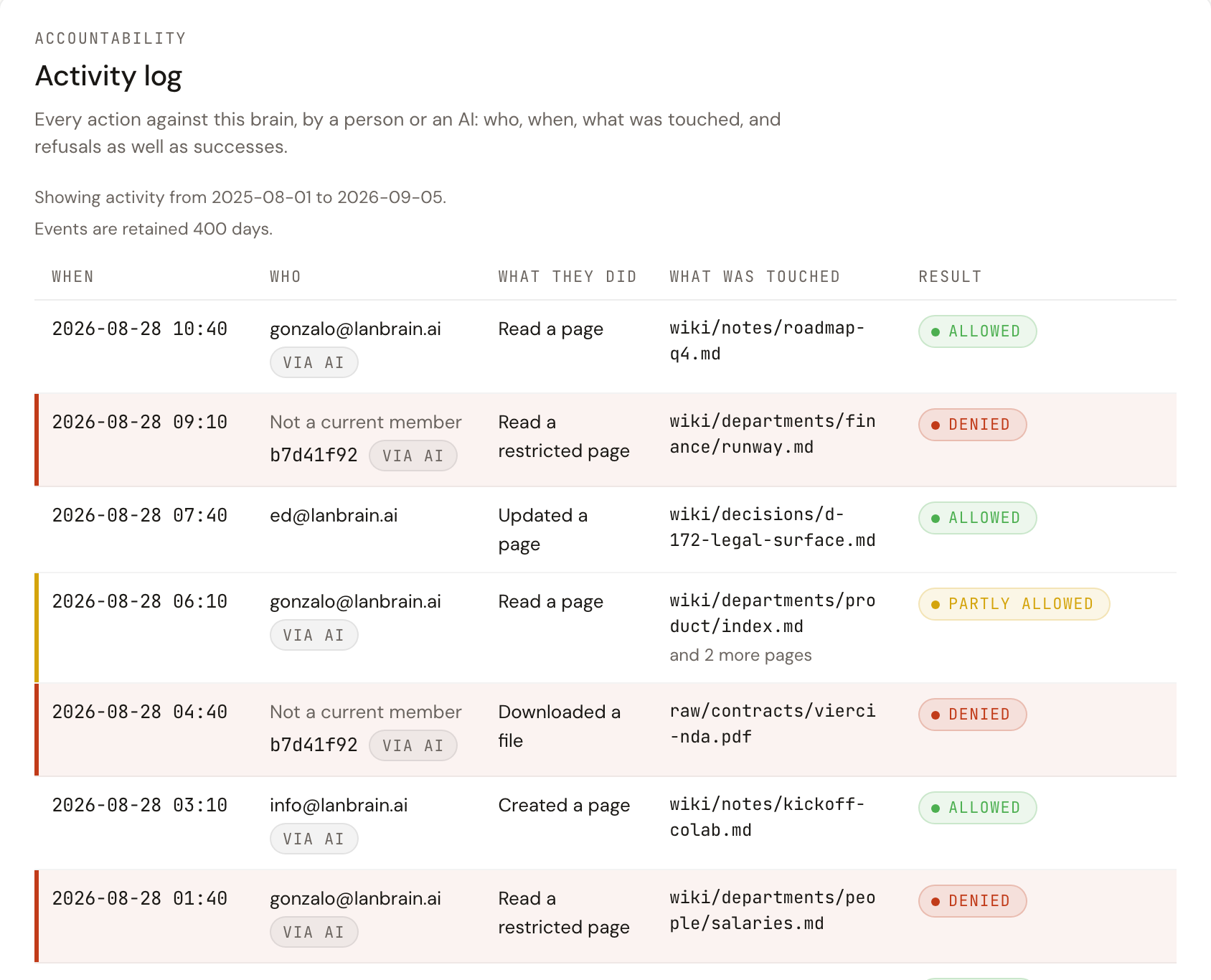
The Audit tab: a denied row names the page and the result, which usually settles whether the problem is access or the client.
The dashboard is the fastest way to tell whether the problem is the client or the brain:
Your brain, Browse: if you can read a page here, the brain is fine and your access is fine; the problem is in the client.
Settings, Audit: every call the AI makes is logged with who, when, what it touched, and whether it was allowed. A denied entry names the page and the reason category, which usually settles the question in seconds.
Status badge in the header: anything other than Ready means the brain is still being set up or its access has changed; connections resume on their own once it is Ready.
Start over
Every client supports removing the connector and adding it again. It takes two minutes and clears every cached state on the client side. Nothing on the brain changes when you do.